
GETTING STARTED
Thank you for choosing Omnisight’s FusionBLADE! Let’s get started with setting up your device. Before installing your FusionBLADE, we recommend creating an account on our dashboard and reading our Installation Guide.
Step 1: Create Your Account
Start by creating or logging into your account on the Omnisight Dashboard. Your account allows you to manage devices, view data, and customize settings.
Step 2: Read the Installation Guide
Before installing your FusionBLADE, check out our FusionBLADE Installation Guide for instructions on proper setup.
Step 3: Configuration and Set Up
- Power on the system.
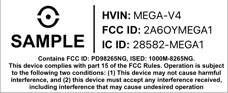
- Locate the device key on the FusionSensor label.
- Go to the Omnisight Connect Dashboard (omnisightusa.com) and create or log into your account.
- Enter the device key to register and configure the system.
- Configure alert behavior and verify connectivity.
Support and Resources
Need help? Visit our Support Page for FAQs, tutorials, and customer service contact information.